
Your Aging Report – A Beginner’s Guide
Your Aging Report – A Beginner’s Guide
Bad Debt Prevention Part 3

What Is An Accounts Receivable Aging Report?
Your accounts receivable aging report lists all of your open or unpaid customer invoices and groups them by the length of time the invoice has been outstanding. This grouping typically includes several time intervals which indicate either the number of days the invoice has been open or the number of days it’s been past due. Typical time intervals include;
0-30 days
31-60 days
61-90 days
91-120 days
121 + days
You can adjust the intervals based on your terms and preferences. If you age from the invoice date your invoices will move into the 30 day column faster than if you age from the due date. (more on this later in this article) If however you have net 10 or net 15 day terms you would adjust appropriately.
Purpose & Importance
Summary: Your receivable aging report is a valuable collection tool, you’ll use it to identify outstanding invoices and late paying customers. Banks and investors can review your aging for a quick evaluation of the financial health of your company.
Collection Tool: The primary function of the accounts receivable aging report is to assist businesses in managing their collections process. By organizing outstanding invoices by age, companies can prioritize their collection efforts. Older invoices might require more urgent follow-up actions to recover the amounts due, ensuring cash flow remains healthy.
Identifying Late-Paying Customers: Quicky identify customers with late invoices. Over time, an astute collector will learn which customers consistently pay late. Recognizing these patterns allows businesses to address the issue, possibly by adjusting payment terms, improving communication, or even reconsidering the credit terms extended to these customers.
Evaluating Financial Health: For banks and investors, the accounts receivable aging report provides a snapshot of a company’s financial stability. A high proportion of overdue invoices might indicate potential cash flow problems, suggesting that the company may struggle to cover its short-term liabilities. Conversely, a low level of overdue receivables can signal efficient credit management and a strong financial position.
Organization – How is the Aging Report Organized?
A useful aging is organized first alphabetically by customer and then by invoice date, then by invoice number. Some programs including Quick Books will organize by date range, the problem with this is you don’t see everything a customer owes in one place – it’s confusing when you are collecting.
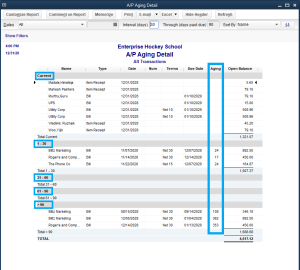
This image is a QuickBooks aging report organized by date range:
See for example how Blitz Marketing has invoices in both the current column and the over 90 – on a large aging this makes it hard to see everything a customer has open in one place – complicating your collection efforts.
This next image also from QB’s is called an open invoice report.
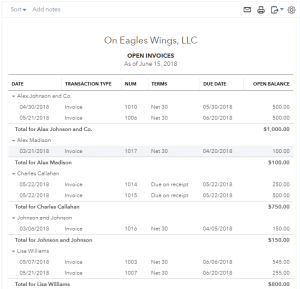 This is the format I use, if I’m using QuickBooks. Organized by customer, then date and invoice number, it’s simple to locate customers with high balances and multiple invoices, while you’ve got to get to everyone eventually, I’ve never met an owner that didn’t want the “big ones” first.
This next and final example is the more traditional format for an aging, it shows current invoices in the current column, invoices 1 to 30 days beyond terms in the 30-day column, invoices between 31 and 60 days in the next and invoices over 90 in the last column. A larger aging may have a 120 -day column. 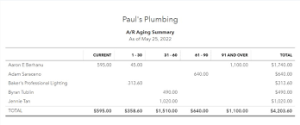
It can be helpful to calculate the percentage of the total of each aging bucket. As an extreme example, if you see that 50% of your receivables are over 90 days old, you know you’ve got a problem and have some work to do. On the other hand, you’re doing a good job if no invoices or a low percentage of invoices are over 90 days. (sorry about the poor image quality – these looked great before I put them into WordPress)
How do I use the Aging Schedule to Improve Collections?
Okay, this get’s us down to the nitty-gritty. The accounts receivable aging schedule will inform your collection process. In other words, it will tell you what to do and where to focus. (aging schedule is another way to say aging report – don’t let the change in language confuse you)
Attitude is Key 

Before we get into the details, let’s talk about attitude. Outstanding balances and late payments are a normal, expected, and unavoidable part of doing business. Delinquent accounts are not a reason to think poorly of, or be rude to a customer. Collection practices that include snippy notices and tone of voice will produce poor results relative to a well-organized, professional but friendly, and consistently executed collection process. This is why it’s important to have a well-thought-out credit policy, but that is a discussion for another day.
Naturally, there’s more than one way to do this. Overly anxious owners will direct you to contact your highest overdue accounts first or even exclusively. But to do the job competently and thoroughly, you’ll need to reach out to every customer with an overdue invoice or late payment.
The Process & Best Practices
Consult your credit policy for when to start making contact, but a good rule of thumb is ten days after the due date. Ten days is enough time to allow for weekends, holidays, and various payment schedules.
Start at the beginning of the accounts receivable Aging and work your way from start to finish contacting every customer with a payment that is more than ten days late. Or resort by balance and start with the late payers with the highest balances, but don’t ignore those smaller accounts! They add up over time.
Contact accounts payable. I usually start with an email. If you don’t have an email address, make a call and be sure to get an email address for follow-up.
I like to start with email because it is less disruptive to the accounts payable department and gives them a chance to reply in their own time without interrupting their work. I generally save calls for unresponsive or problem customers and those for whom I don’t have an email address.
Highlight the customers you’ve contacted on the aging to avoid confusion, so you know who you’ve already contacted, I usually color code – light orange means I’ve sent an inquiry, yellow means it’s paid. You’ll develop your own system over time but don’t assume you’ll remember. If you’re working the whole aging as I recommend you won’t.
Here is my process summarized:
- Day 10 to 12: Send the first email inquiry and schedule a follow-up 5 to 7 days later. Be sure to either attach a copy of the invoice or include a list of open invoices. Note: Some ar managers or owners may feel this schedule is not sufficiently aggressive. In my experience many busy accounts payable departments are instructed to reply within 1 week – to maintain a positive relationship with them it’s best to give them the time.
- Five to seven days later: Send a 2nd request email – schedule a follow-up for three to five days later. Note: Actually type 2nd Request in your subject line, it works.
- Three to five days later: Call anyone who hasn’t responded, send a 3rd request email, and schedule a follow-up 2 to 3 days later. Note: Always leave a complete message with invoice information. Don’t leave a 5 min message listing every every invoice, give enough information for them to know who you are and you to know who they are when they call back.
- Two to three days later: Try calling again, send another email. Tag these customers for more aggressive follow up.
Document every attempt and record the results of your efforts in your CRM (customer relationship management software). Schedule your follow-up calls in your CRM as well. This information will inform future collection efforts and credit decisions. If you ever have to sue these documents will help make your case. You’ll have to show a judge you made a good faith effort to collect.
Customers who haven’t responded to these efforts may be a problem, but it’s equally likely that you are not calling or emailing the right person. Check your documentation, try calling purchasing they can often put you in touch with the right person. If that doesn’t work ask for a manager and if that doesn’t work you have a problem. Consult your credit policy or manager or (shameless pitch) Cash In for next steps.
How do I Create an Aging Report?
Back in the day, and I’m not going to tell you how far back, we’d manually create an aging by reviewing each account ledger and writing the invoice amount in the appropriate column on a columnar pad. There was no Excel back then. It would take me three full days every month to create it.
Now, we don’t create an aging; we generate one. It’s a simple matter of choosing from a reports menu in your accounting software. You can run a summary aging or a detailed aging in most programs. (If your accounting software doesn’t do this get new software) A summary aging will list each customer alphabetically, one line per customer (see sample agings above) and the total that customer owes. The total amount of each column is calculated at the end of each column.
For collections purposes, you’ll want to run a detailed aging. The detailed Aging will have the invoice date, invoice number, and the amount due for each unpaid invoice owed to your company. Each invoice is listed in the appropriate 30-day column based on the established payment terms. With this information, you can decide where to focus your efforts.
Need More Detail?
For a more in-depth discussion of how to maintain healthy cash flow and collect your aging accounts as well as how to schedule calls, and what to document read my article titled Accounts Receivable Collections – A Guide.
FAQ’s
What is an Average Collection Period?
The average collection period is the average number of days it takes a business to collect its accounts receivable. It is one of six primary calculations used to determine short-term liquidity, meaning the ability of a company to pay its bills as they come due.
How Do I Calculate Average Collection Period?
To calculate your average collection period, you need three numbers.
- Average accounts receivable: Also called the amount of receivables or AR owed to your business within a particular time period.
- The number of days in the respective time period of your average amount of receivables. So you might calculate for the year, 365 days or the quarter, 90 days.
- Total credit sales you’ve made in the respective time period of your average amount of receivables. So the total sales offered on credit during the same time period (don’t include COD sales)
The formula is accounts receivable x the number of days in the period you’re considering / total credit sales. Or use this great calculator I found.
https://www.omnicalculator.com/finance/average-collection#average-collection-period-formula
What is Allowance for Doubtful Accounts?
Allowance for doubtful accounts is another term for Bad Debt Reserve – it’s an estimate of the amount of accounts receivable that customers will not pay.
What is AR and What is an AR Aging Report?
AR is an abbreviation for Accounts Receivable, and AR Aging Report is an abbreviation for Accounts Receivable aging report.

